How To Create Pull Request
How to create pull request?
Pull request is reqest to merge one git branch into another git branch.
Branch is just snapshot of code in history, when we merge two branches, we’re basically applying changes from one branch to another.
In most cases, there’s one main branch called master which should
be best working example that works as it should. Rest of the branches
are created for development purposes devel-<feature-name> branches
or hotfix, bugfix etc..
General idea is to create new branch called devel which will be
used for development and updated regulary. After testing and
developing, there’s no reason to add some new working feature
or bugfix to master.
In order to do so, execute following steps:
[1.] Create git branch
git checkout -b <branch_name>
[2.] Code something of value, stage and commit changes
git add my_code.cpp #staging
git commit -m "Added my_code.cpp" #commiting
[3.] Push commited those changes to remote (apply local changes to remote (github) repository)
git push -u origin <branch_name>
[4.] After pushing to remote, something like this should show in command line:
Enumerating objects: 3, done.
Counting objects: 100% (3/3), done.
Writing objects: 100% (3/3), 918 bytes | 918.00 KiB/s, done.
Total 3 (delta 0), reused 0 (delta 0)
Remote: Create a pull request for ‘new_branch’ on GitHub by visiting:
Remote:   http://github.com/example/Demo/pull/new/new_branch
Remote:
 * [new branch]         new_branch -> new_branch
[5.] You can click http://github.com/example/Demo/pull/new/new_branch to enter PR creation process.
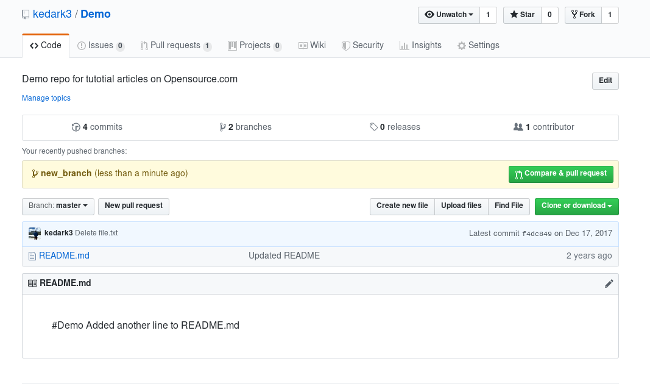
[6.] First you need to click on Compare & pull request green button, which is shown in Figure 1.
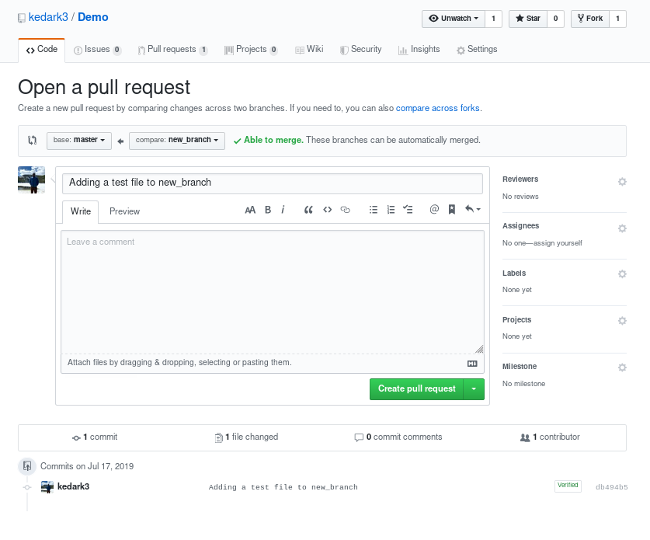
[7.] After that you can give name to pull request, choose branches to merge and Create Pull Request by clicking on green button shown in Figure 2.
Pull reqests are great tool, especially for collaboration. Main reasons are:
- code-review functionality (review code before merging)
- notifies other developers there are some changes made (prevents misunderstandings, and/or possible bugs)
- can be rejected if not good enough (good coding practice)